The hardest parts of mobile app testing, each one run for real
Permission prompts, notifications, SMS codes, Face ID, location, crashes, old OS versions. Why each is hard to test, and a real run of each with its result and video.
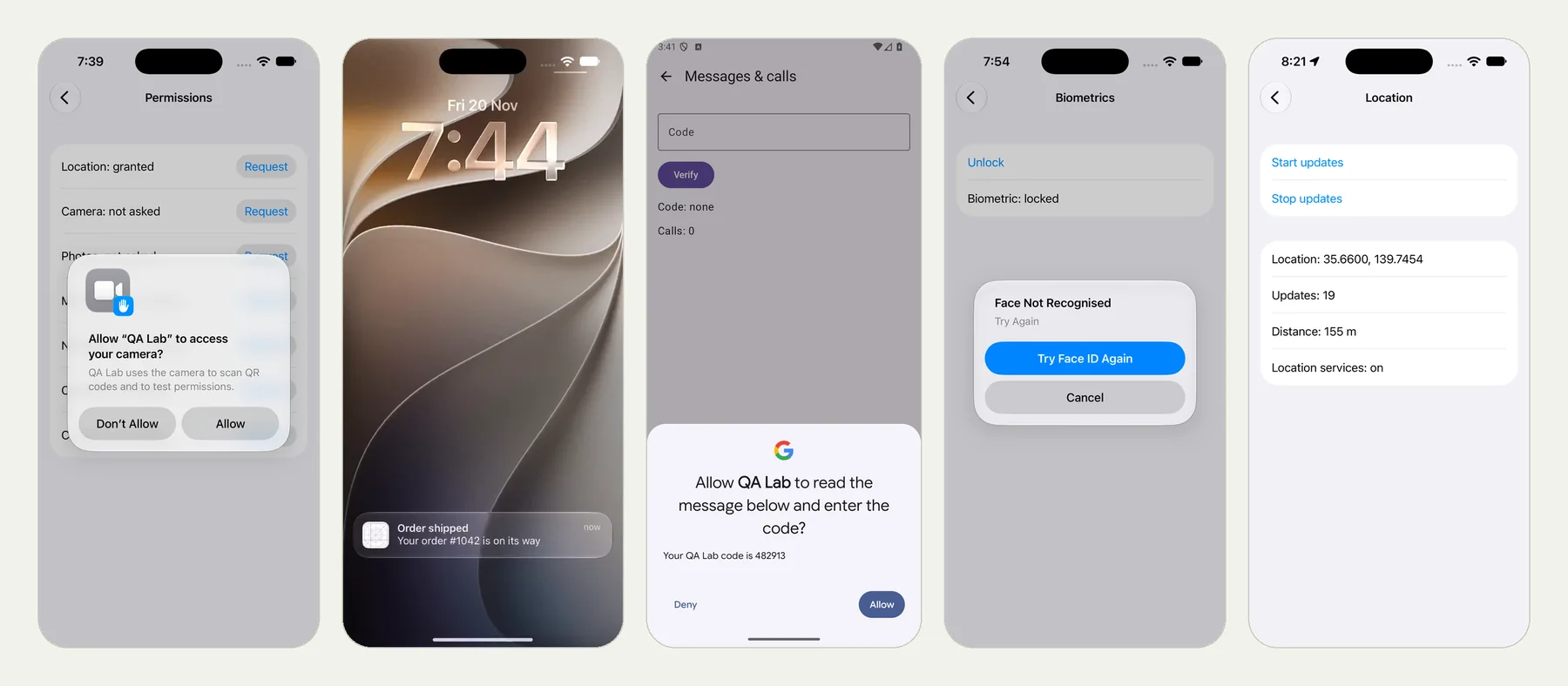
Why mobile is harder than web#
A website runs in a browser tab, and a test can see everything in the tab. A mobile app runs on a phone, and the phone keeps interrupting.
It draws its own prompts on top of your app. It delivers messages, links and calls from outside. It changes state under your app: the network drops, the screen turns, the user switches to dark mode. It closes your app when it wants the memory. And there is not one phone. An app can behave differently on each OS version, and on a tablet.
We took the parts of mobile testing that are hardest to do at a desk and sorted them by why they are hard. Then we ran every one of them, as a plain-language test, on our practice app QA Lab. Each section below links to a post with the test text, frames from the run, the result page and the review video.
1. The phone draws it, not your app#
Permission prompts, the Face ID sheet and notifications are not in your app's screens. Your app asks, the phone shows something, and your app is told the answer. A test that can only see your app cannot see them or press them.
- Permission prompts. Location allowed, camera denied, microphone denied, contacts allowed, each prompt answered as the test said. Android's own guidance is that an app should keep working when the answer is no, and that the system stops asking after repeated denials. That is the path worth testing. 10 checks, 2 min 54 s.
- Face ID. A face that does not match, then one that does. The refusal is the half nobody can test by hand, because the tester's own face always matches. 6 checks, 1 min 59 s.
- Notifications. Wait for the notification, tap it, check which screen the app opens. Run on iPhone and on Android. 5 checks, 2 min 21 s.
2. It arrives from outside#
Some inputs never pass through your app's own buttons. They come from the Messages app, from a link in an email, from the phone network.
- An SMS code. A text arrives during the run, Android offers the code to the app, the app verifies it. No SIM and no second phone. 6 checks, 2 min 9 s.
- Deep links. Open a link on the phone and check that the app lands on the right item, not the home screen. 5 checks, 2 min 9 s.
- An incoming call. The phone rings for three seconds while the app is open. 4 checks, 1 min 17 s.
3. It is the phone's state, not the app's#
To test these by hand you have to do something to the phone: walk out of Wi-Fi range, drain the battery, go outside.
- Offline and low battery. Network off, network on, battery at 15% and unplugged. 8 checks, 1 min 29 s.
- Location. Put the phone at Tokyo Tower and move it 156 metres at 10 metres a second. The app measured 155 m. An earlier, looser version of the same test passed on a distance of 11,104 km, which is its own lesson. 8 checks, 2 min 14 s.
- Rotation, dark mode and large text. Three settings that change every screen at once, flipped mid-run. 13 checks, 1 min 58 s.
4. It happens when nobody is looking#
- The phone kills your app. Type a draft, have the phone end the app in the background, reopen it. Android's documentation is blunt that a background app's process can be killed and its state must be saved to survive. The result shows the process id before and after. 6 checks, 2 min 24 s.
- A crash. An ordinary checkout test hit a planted crash. The result names the error, the file and line, the step it came after and the stack trace. Failed, as it should, in 1 min 23 s.
5. It is your app, shown somewhere else#
- Live Activities and widgets. The lock screen, the Dynamic Island and the home screen. The test added a widget through the widget picker, the way a person does, and read the number on it. 12 checks, 4 min 59 s.
6. There is more than one phone#
- OS versions and tablets. The same permission test on iOS 17, 18 and 27 and on an iPad, and the same notification test on Android 16, 12 and 10. The contacts prompt was a small alert on iOS 17 and a full sheet from iOS 18. Android only asks before notifying from version 13. The test text did not change once. Seven runs, all passed.
What the runs have in common#
Every test above is a paragraph of plain text. None of them has a selector, a wait or a line of code. The steps that touch the phone itself, such as "set the phone's location", "have the phone kill the app" or "have an SMS arrive", are written in the same sentence style as the rest.
Every result has the same parts: each check with the value it was decided on, a replay of every tap, a review video, and for a failure what was expected, what was seen and how to reproduce it.
And every run in this series can be opened. Each post links to its run, read-only, until 18 February 2027.
What this series does not show#
- Your backend. The notification and the SMS in these runs are produced on the phone by the test. They show what your app does when a message arrives, not whether your server sent one.
- Hardware. Bluetooth accessories, NFC taps and camera quality need the hardware in someone's hand.
- Every combination. Each run here is one device and one OS version. The same test can be run on others, and should be for the screens that matter.
The same exercise for websites is in The hardest parts of web testing, each one run for real.
Try one#
Pick the item on this list that your team skips, and write three sentences about it. Upload a build, choose iPhone app or Android app in New test, and paste them. Android and iOS apps says which build to upload.
Filed underiPhone and iPadAndroid