Test a React Native app in plain English, without test IDs
React Native end-to-end suites are hard to set up and keep green. Write the journey in plain words, run it on iPhone and Android, and get a verdict with a replay.
Why so many apps have no end-to-end tests#
At React Summit, a talk on mobile end-to-end testing opened with an admission most React Native teams would recognise: most of the time there are no end-to-end tests at all, because there are a lot of pain points. The speaker had tried Appium and Detox before settling on a newer tool. A 2026 guide on the subject says the same thing in one line: end-to-end testing for mobile has historically been a painful experience, with flaky tests and complex setup.
The usual pains:
- Test IDs have to be added to components, and kept in sync as screens change.
- Each framework has its own driver, build setup and CI configuration.
- Tests wait on timing and break when an animation takes longer.
- Two platforms means two sets of quirks.
Describe the journey instead#
Testsy tests the build you upload, on iPhone, iPad and Android, from a description:
Open the app and sign in with the stored account "customer".
On the Home tab, open Settings and switch Units to Fahrenheit.
Go back to Home and check the temperature is shown in °F.
Close the app and open it again; check it still shows °F.
No test IDs, no selectors, no driver code. The same text runs on iOS and Android; the tester finds the controls on each.
What you get back#
Each check with the value it was decided on and the screen it was read from, a replay with every tap drawn, a video of the device, and the device log. A crash fails the run with the error and the top of the stack trace.
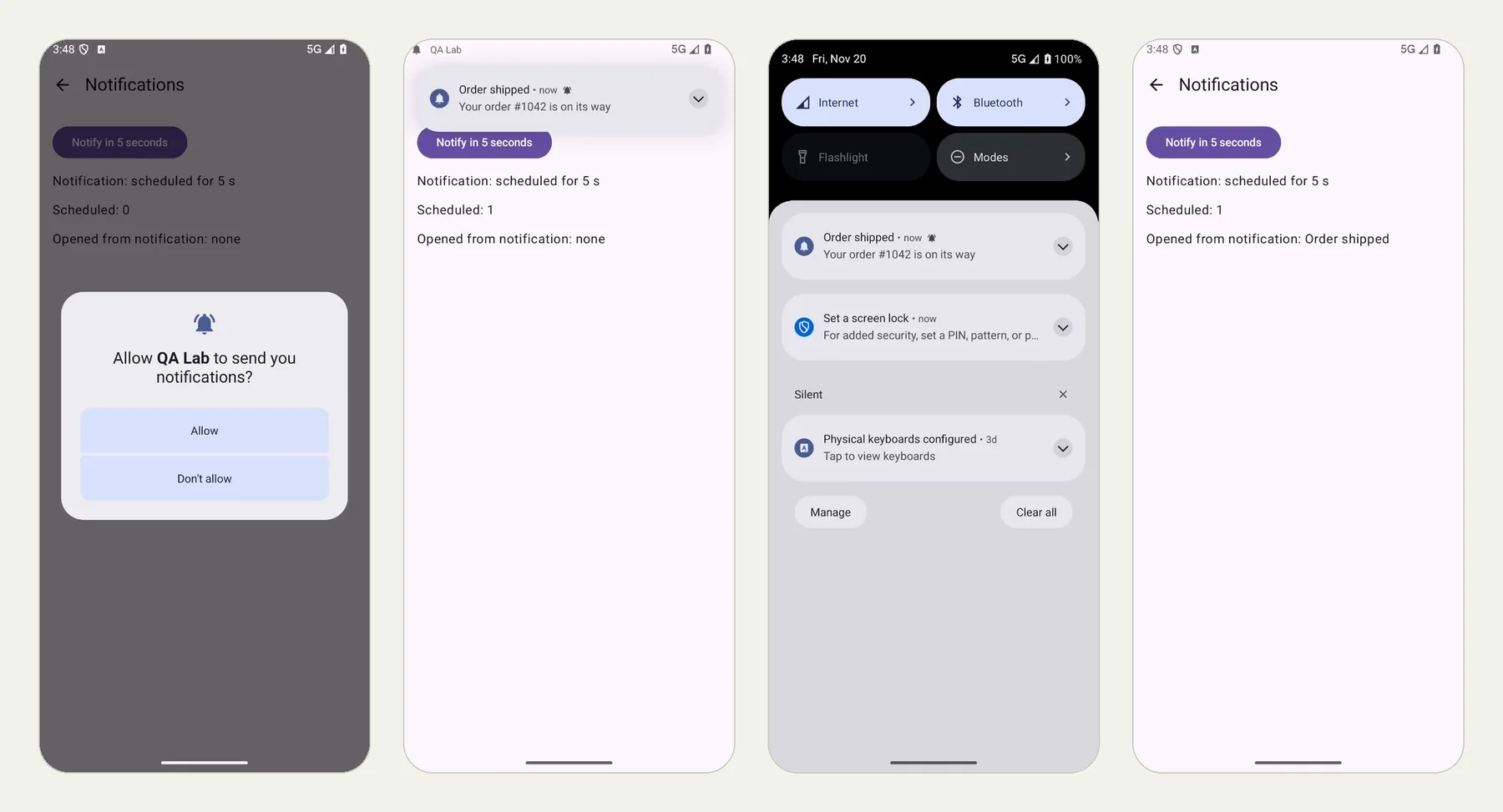
We ran one test on iPhone and Android without changing a word: Test that a notification opens the right screen. The picture at the top of this page is the Android run.
The build#
Upload a release build, with the JavaScript bundled in: a debug build expects Metro on your computer, which our devices cannot reach. For Android, include both arm64-v8a and x86_64 native code (-PreactNativeArchitectures=arm64-v8a,x86_64); for iOS, a zipped .app built for testing. Details: Android and iOS.
Keep what you have#
If you already have Detox or Maestro flows that are green and cheap to keep, keep them. Use plain-language tests for the journeys that break your scripted suite most often, and for the parts it cannot reach: system prompts, notifications, an SMS code, a second phone. The mobile series has a real run of each.
This post is part of Mobile release testing: a guide for app teams.