What survives when a user deletes and reinstalls your app
On iPhone, deleting an app clears its files but not its keychain, so a reinstall can come back signed in. A real run shows the note wiped and the token still there.
"I deleted it and it still knew me"#
A user signs out the hard way: they delete your app. Months later they install it again, and it opens signed in to their old account. Or worse, a family member installs it on the same phone and lands in someone else's account.
This is how iOS works, and it surprises developers and users alike:
- An Apple engineer confirmed on Apple's developer forums that keychain values are not reset after an app is uninstalled, and a later reply in the long-running thread notes it was still the case with iOS 17.5.
- A user on Apple's community forum describes reinstalling an app years after deleting it and being signed in to the old account.
- An Expo developer found that after reinstalling, the data seems to be remaining and they were still signed in. Secure storage libraries on iOS (Expo SecureStore, react-native-keychain, flutter_secure_storage) write to the keychain.
The app's own files and preferences are deleted with it; the keychain is not. So an app that keeps its session token in the keychain, and its "has this user signed in before" flag in its preferences, comes back half-remembering.
What the run showed#
We tested exactly this on an iPhone with iOS 27, with our practice app QA Lab. The test saved a note (kept in the app's preferences) and a token (kept in the keychain), deleted the app, installed it again and looked at both.
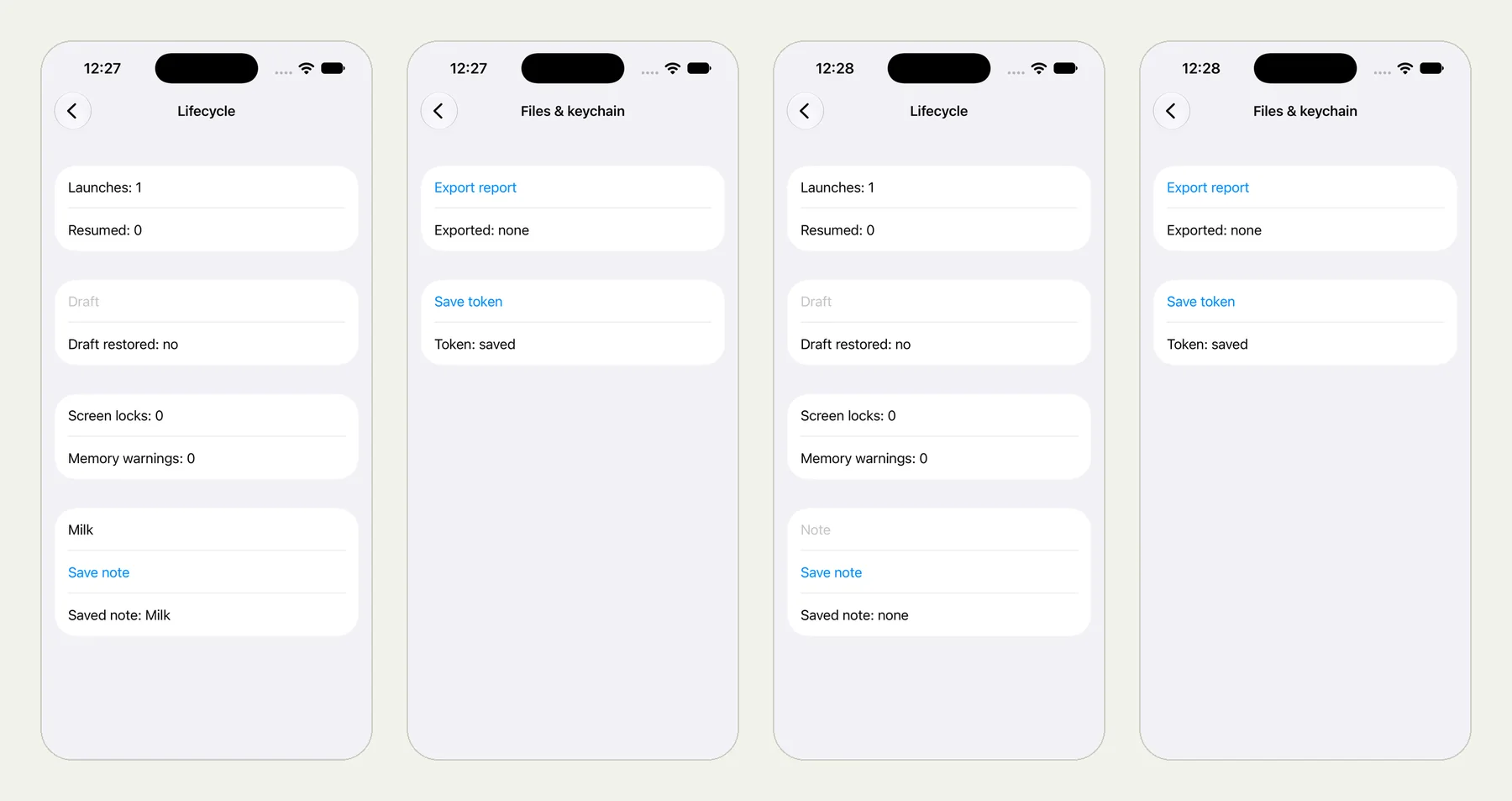
The picture at the top of this page shows four screens from that run: the note saved, the token saved, then after the reinstall the note gone (Saved note: none) and the token still there (Token: saved). All 11 checks passed in 3 minutes 4 seconds.
Go back, open Lifecycle, type Milk into Note and tap Save note;
verify Saved note: Milk. Go back, open Files & keychain and tap
Save token; verify Token: saved. Then uninstall the app, install
it again, open Lifecycle and verify Saved note: none. Then open
Files & keychain and record what the Token line says.
(The full test also ran an accessibility audit first, which has its own post.)
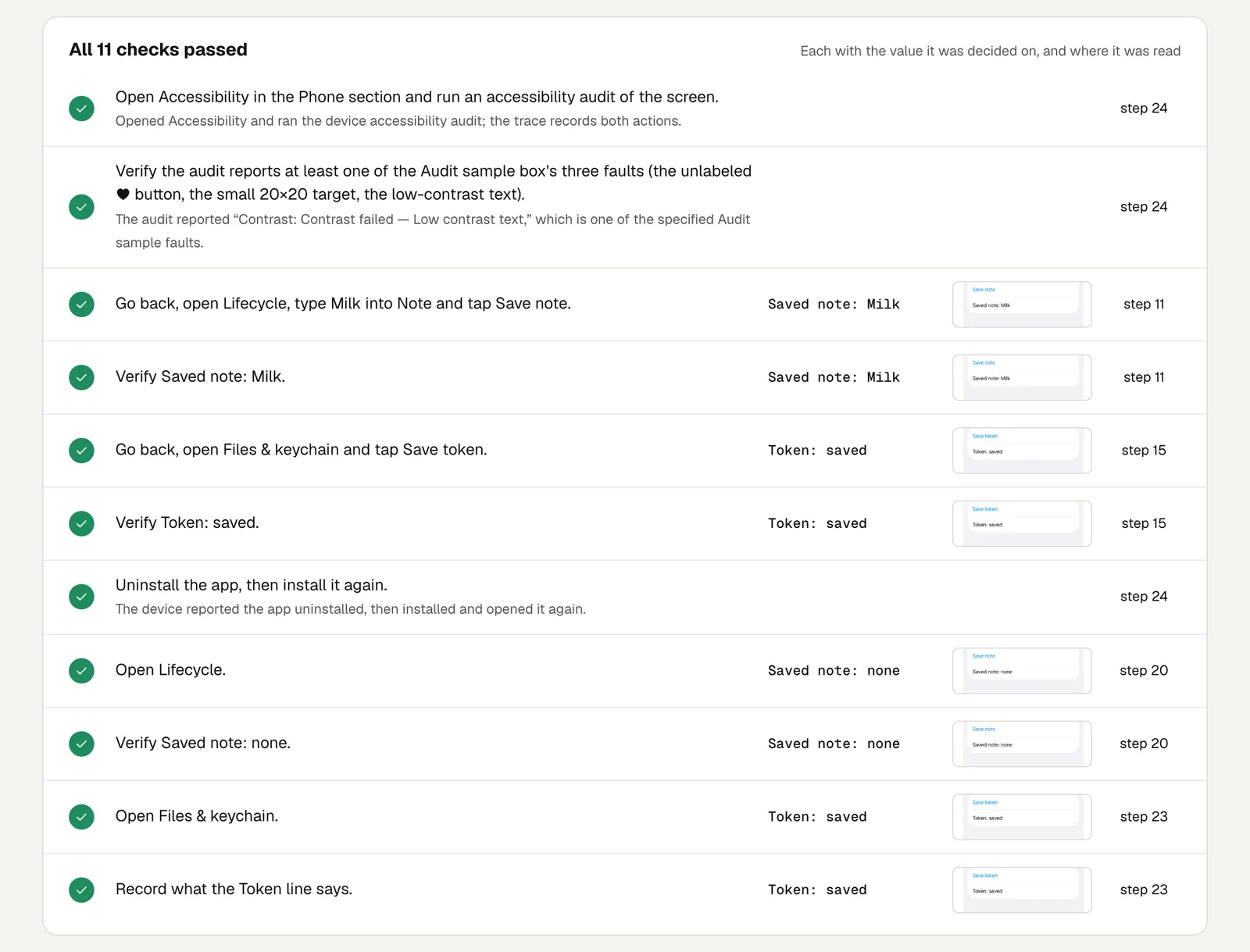
Note the last line: we did not tell the tester what the token should be. We asked it to record the value, and it reported what the screen said. That is the right way to find out how your app behaves before you decide what it should do.
Open the run (live until 18 February 2027). One detail on the result page: it reports that the app "closed unexpectedly" after step 16. That is the uninstall the test asked for; the tester reports any time the app's process ends.
Decide, then test the decision#
Once you know what survives, decide what should happen and turn the "record" line into a check:
- Sign out on reinstall (the common choice): on first launch, if your preferences say this is a fresh install, clear the app's keychain items. Then: "After reinstalling, check the app shows the sign-in screen."
- Stay signed in on purpose, for example a banking app with a device-bound key: "After reinstalling, check the app asks for Face ID before showing the account."
Run it on Android too. There, uninstalling removes the app's data, but Android's backup can bring some of it back on a reinstall, so the answer depends on your app's backup settings: record it rather than assume. One test, two platforms: one test for iPhone and Android.
This post is part of Mobile release testing for app teams.
Filed underiPhone and iPadSign-in and codesPhone state