Your coding agent said “done”. Here is what it did not check
Agents mark features complete after the code compiles and the unit tests pass. Why that misses broken screens, and how to check the feature as a user would.

“Done” means the agent stopped#
You ask Claude Code, Cursor or Codex for a feature. A few minutes later it reports back: implemented, tests passing, ready to go. You open the app and the button does nothing.
This is common enough to have names. Developers call it "fake done" or "false completion", and it is not limited to one tool. One developer who logged 140 Claude Code sessions wrote down every gap between what the agent said it did and what the logs showed.
Anthropic describes the same thing in its own engineering write-up on long-running agents: one major failure mode it observed was Claude's tendency to mark a feature as complete without proper testing. The same post reports that Claude did much better once it was told to test in a browser the way a user would.
What the agent actually checked#
When an agent says it tested something, it usually means one of three things:
- The code compiles. Nothing about whether it runs.
- The unit tests pass. Only the tests that exist, and often tests the agent wrote in the same session, against the code it just wrote. A guide on false completion puts it plainly: passing tests only prove what they test.
- A request returned 200. The server answered. The page a person sees may still be blank, or show "undefined", or save nothing.
None of these opens the app, clicks through the feature and looks at the result. That is the step a person does when they say "it works", and it is the one most often skipped.
Check it from the outside#
The fix is a check that does not share the agent's assumptions: something that opens the deployed app in a browser, does what a user would do, and reports what it saw.
With Testsy that check is a paragraph of plain text:
Sign in with the stored account "customer".
Open Projects and create a project named "Launch notes".
Reload the page.
Check that "Launch notes" is still in the list and opens.
The tester runs it in Chrome against your live address, or on an iPhone or Android phone for an app, and comes back with a verdict and the evidence behind it: each check with the value it was decided on, the screen it was read from, a replay of every step and a video.
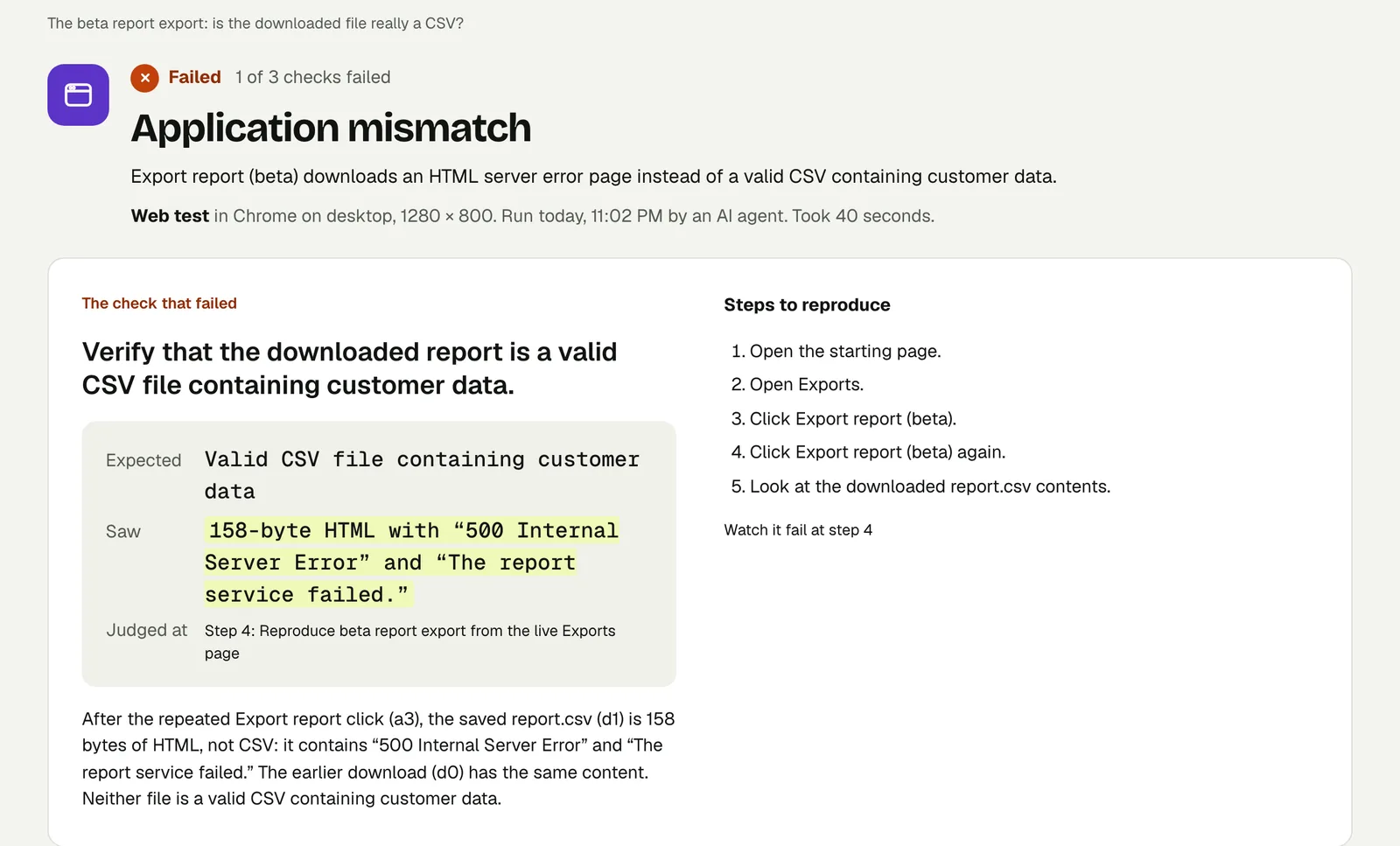
That run is a planted bug on our practice site. The page said "Export started: report.csv", which is what an agent checking the response would have seen. The tester opened the file and found 158 bytes of HTML reading "500 Internal Server Error". Open the run to see the failure card; the link stays live until 18 February 2027.
Close the loop with the agent#
The useful part is what happens next. A failed check comes with Copy fix prompt: the check that failed, what was expected, what was seen, the steps and the link to the proof, ready to paste back into the agent. Copy the fix prompt into your coding agent shows one.
If the agent is connected to Testsy over MCP, it can do this itself: run the saved test after its change, wait for the verdict, read the failed check and try again. The test is the same every time, so "done" stops being the agent's opinion. Setup guides: Claude Code, Cursor, Codex.
What this does not replace#
A browser test checks what a user can see and do. It does not read your code, review your database rules or load-test your server. What an AI tester cannot check for you lists the gaps honestly.
Try it on your app#
Paste your app's address into New test, describe one thing the agent built in three sentences, and run it. The free trial has 10 runs and needs no card. The quickstart takes a few minutes.
This post is part of Testing an app you built with AI.
Filed underWebAI-built appsVerdicts and proof