Test gestures in a mobile app: long press, swipe, drag and pinch
Gestures are where mobile UI tests are weakest and where gesture libraries clash. A real iPhone run does long press, swipes, drag to reorder, pinch and rotate.
Where taps stop being enough#
A tap is easy to test. The gestures that make an app feel native are not: a long press that opens a menu, a swipe that deletes, a drag that reorders a list, a pinch that zooms a photo or a map.
They are also where apps break. Gesture handlers compete with the scroll view they sit in, and the losing one silently does nothing. The issue trackers of the libraries most React Native apps use are full of it: a swipe-to-delete row inside a ScrollView that stops either the swipe or the scroll from working; a list whose scrolling stops when swipeable rows are added; swipe actions that work on iOS and not on Android. Native apps have the same kind of question on Apple's forums: swipe actions on list items that do nothing when the list sits inside a horizontal scroll view.
And they are what scripted tests do worst. A script has to compute coordinates, durations and paths for each gesture, per screen size, and it breaks when the layout moves.
The test, in words#
Open Taps: tap the blue pad twice, double tap the green pad once
and long press the orange pad once, then verify Taps: 2 · Double
taps: 1 · Long presses: 1. Go back, open Swipes, swipe left once
and then up once, and verify Last swipe: up · Swipes: 2. Go back,
open Drag, drag the purple square into the drop zone and verify
Dropped: yes, then move Alpha to the bottom of the list and verify
Order: Bravo, Charlie, Delta, Alpha. Go back, open Pinch & rotate,
zoom the card in to about twice its size and rotate it by about 90
degrees; verify a scale between 1.6 and 2.6 and a rotation between
60° and 120° in either direction.
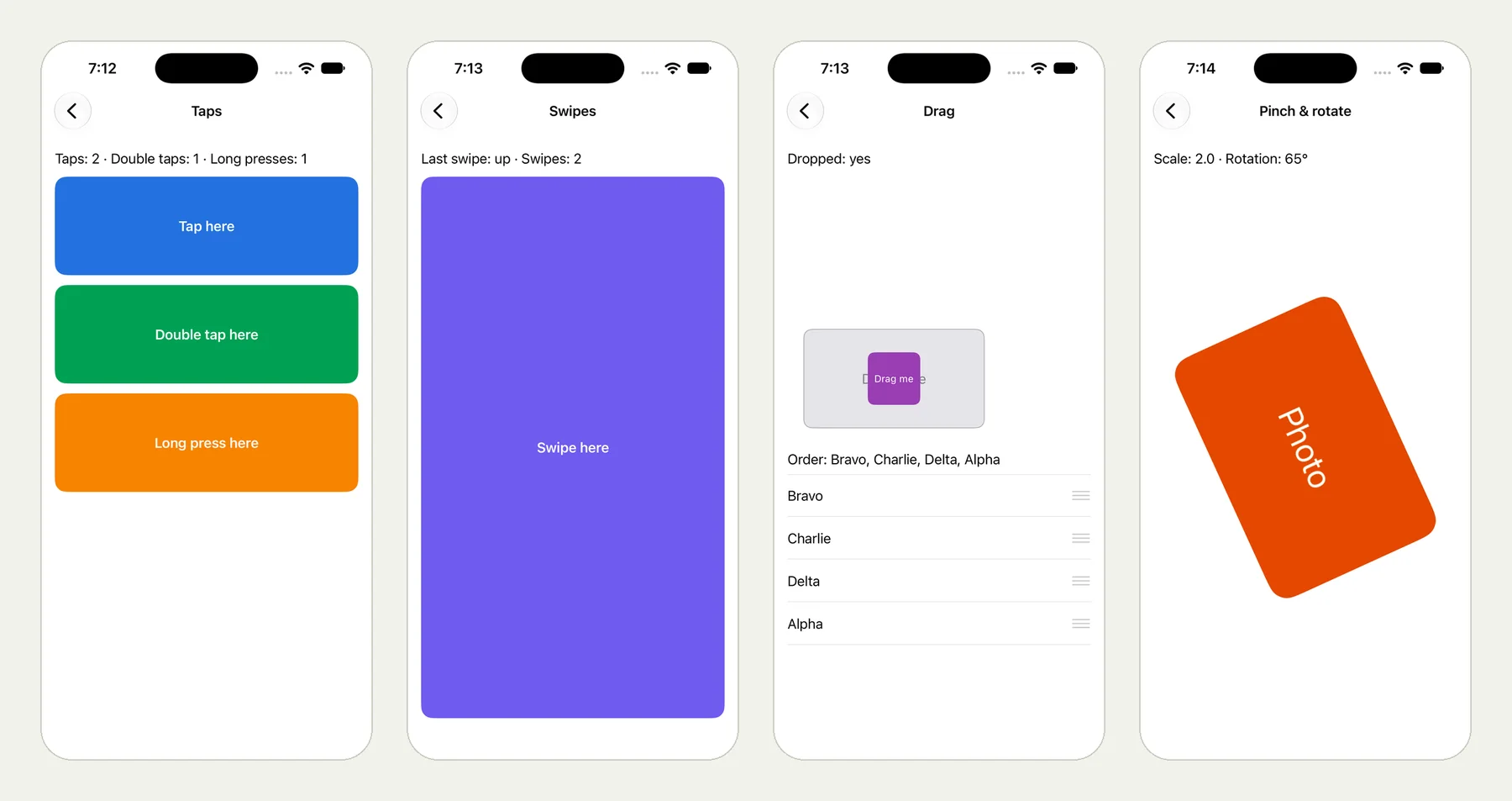
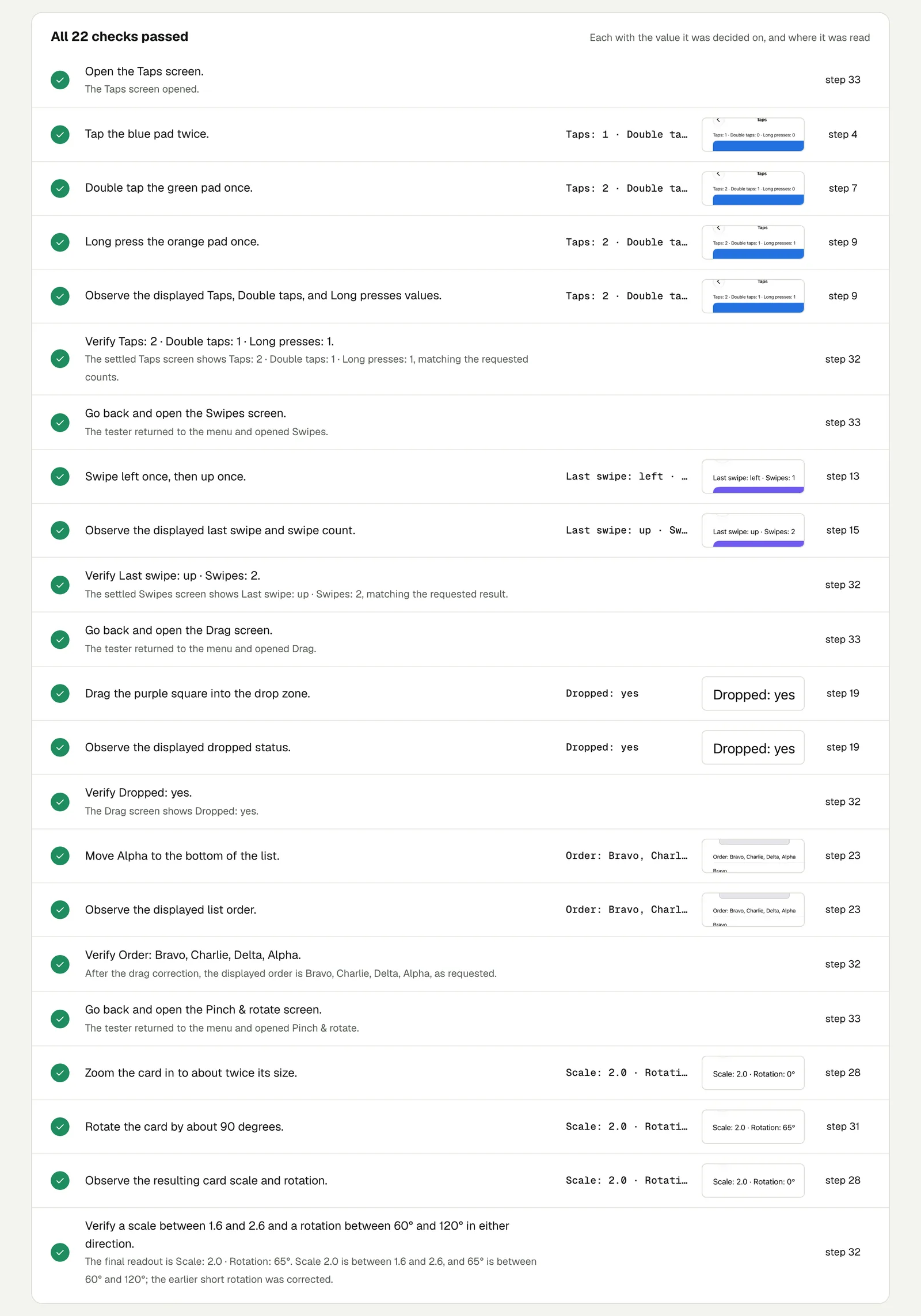
We ran it on an iPhone with iOS 27 and our practice app QA Lab. The picture at the top of this page shows four moments from the run: the tap counters, the swipe result, the reordered list and the card after pinch and rotate. All 22 checks passed in 3 minutes 32 seconds.
Two gestures needed a second try#
The result is honest about what did not work at once, and that is worth reading:
- The reorder. The first drag left Alpha second in the list, not last. The tester saw it, dragged again, and the order then read Bravo, Charlie, Delta, Alpha.
- The rotation. The first rotation reached 44°, short of the range. The tester adjusted it to 65°, inside 60° to 120°, and the check names both values.
Two things follow for your own tests:
- Give gestures a range, not a number. "About 90 degrees" checked as "between 60° and 120°" is a test a person could pass too. An exact 90° is not.
- Check the result, not the gesture. Every check here is on what the app shows afterwards (a count, an order, a scale). That is what makes it a test of your app, not of the finger.
Open the run (live until 18 February 2027).
Gestures worth a test in your app#
- Swipe to delete or archive a row, then check the row is gone and the count changed. On Android too: the issues above show the two platforms can differ.
- Long press an item and pick an action from the menu that appears.
- Drag to reorder, then reload and check the order was saved.
- Pinch to zoom a photo or a map, then check something only visible zoomed in.
- Pull to refresh a list, which has its own post with an Android run.
This post is part of Mobile release testing for app teams.
Filed underiPhone and iPadHard interactions