Let your coding agent test the mobile app it just built
Claude Code, Cursor or Codex builds the app, uploads the build over MCP without an API key in the shell, runs your saved app tests and reads the verdict.
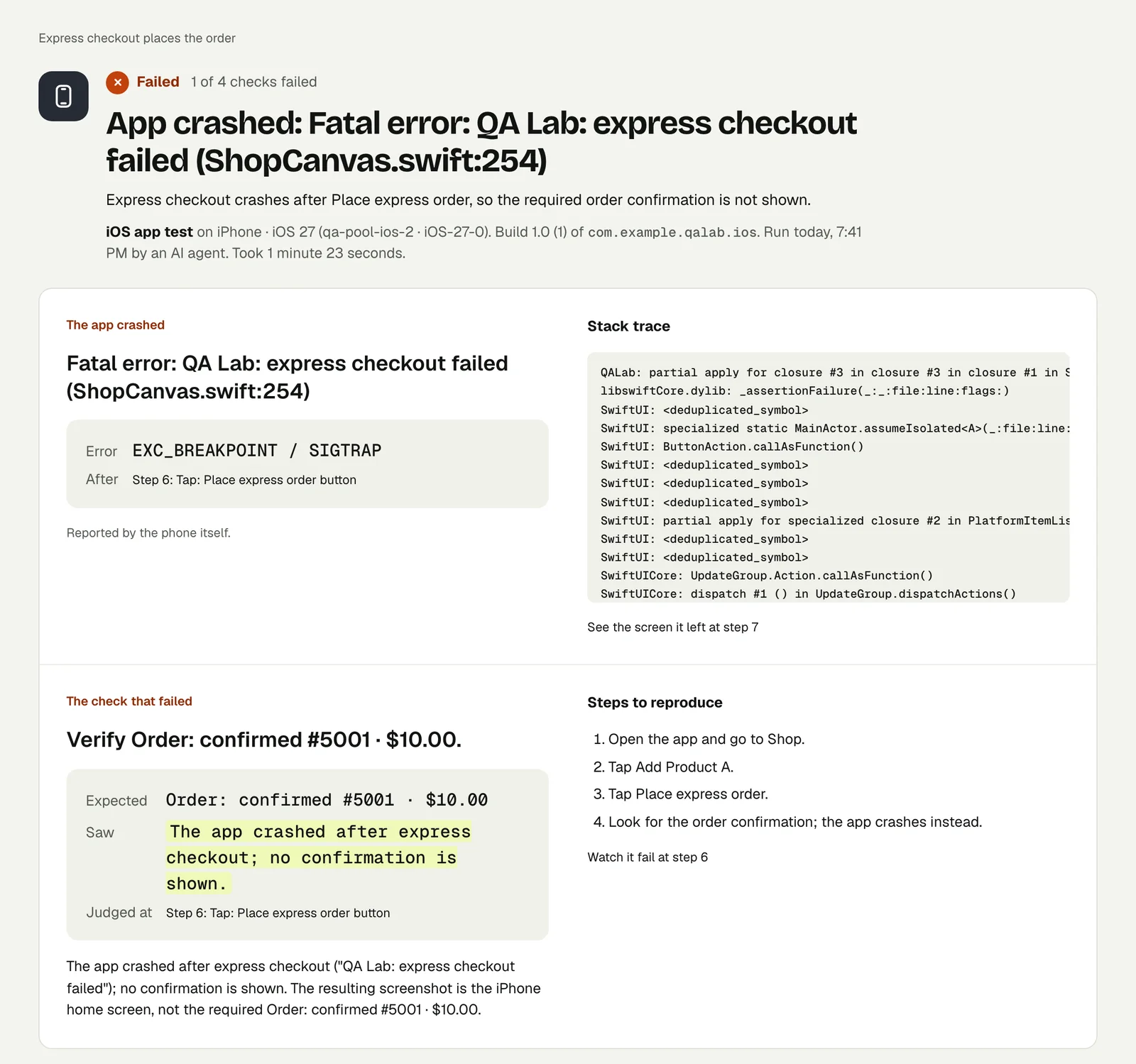
The loop that is harder on mobile#
For a website, a coding agent can deploy and someone can open the page. For a mobile app, "check it works" means building, installing on a device, tapping through, and reading what happened. Agents generally stop at "it compiles".
Testsy's MCP server gives the agent the rest of the loop: upload the build it just made, run the app's tests on it, wait for the verdict and read every check, including the crash and its stack trace if there was one.
The flow#
From the MCP docs:
find_buildwith the file's sha256, or the fingerprint of its native inputs: if the project already holds this build, use it and skip to step 4.- Otherwise
create_build_uploadwith the file name and size. It returns signed links and a shell command. - The agent runs the command in its shell. It downloads the command-line tool, uploads the file in parts and completes the upload. The links work for a few hours and only for this upload; no API key is needed in the shell.
run_testwith the test and the build id, orrun_projectwithbuildIds, thenwait_rununtil the verdict is final.
A build never travels through tool arguments, and the server never reads a path on your computer.
What the agent reads#
get_run returns each check with its outcome and reason, the values read, and links to the video and screenshots. If the app crashed, the result names the error, the step it came after and the top of the stack trace, which is what the agent needs to fix it. Our published crash run shows that card: Catch a mobile app crash with its stack trace, the picture at the top of this page.
On another device, this time#
To check the same build on an iPad or an older Android, the agent adds device, osVersion or orientation to run_test. The saved test keeps its own setting.
Setup#
Connect the agent: Claude Code, Cursor, Codex or Gemini CLI. Run permission is enough to upload builds and run tests. The build must be one our devices can run: an APK with both arm64-v8a and x86_64 native code, or a zipped iOS .app built for testing (see the build guides).
Each app run counts as one run, like a web run.
This post is part of Mobile release testing: a guide for app teams.
Filed underiPhone and iPadAndroidAI-built appsCI, schedules and agents